2016 Toyota Corolla Key Fob Battery: Find The Right Fit Fast
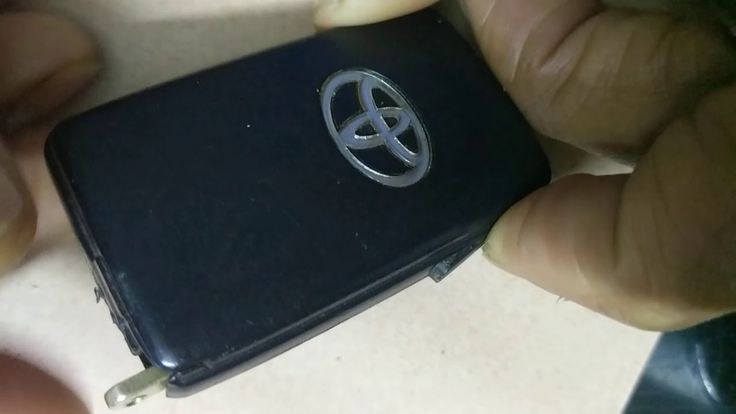
Finding the correct battery for your 2016 Toyota Corolla key fob is essential for ensuring your vehicle remains secure and convenient. This small component powers the remote that allows you to lock your doors and access your trunk without needing to dig for a physical key.
Identifying the Correct Battery Type
Before purchasing a replacement, you must determine the exact battery type required for your specific model year. Unlike generic devices, modern car key fobs require a specific voltage and size to function correctly with the vehicle's computer system. Using the wrong battery can result in intermittent connectivity or complete failure of the fob.
For the 2016 Toyota Corolla, the key fob typically utilizes one of two common battery types depending on the specific trim and key design. The most standard battery is the CR2032, which is a 3-volt lithium coin cell. However, some models or remote configurations may require a CR2025 or similar variant. It is critical to verify the existing battery's specifications before making a purchase to ensure compatibility.


Step-by-Step Replacement Guide
Replacing the battery in your 2016 Toyota Corolla key fob is a straightforward process that requires minimal tools. You will typically need a small flathead screwdriver or a coin to pry open the key fob casing. The steps generally involve locating the small release tab on the side of the fob, carefully separating the two halves, and removing the old battery before inserting the new one.
- Locate the battery compartment on the back of the key fob.
- Use a thin object to gently pop open the compartment cover.
- Remove the old battery, noting the positive (+) side orientation.
- Insert the new battery with the correct polarity facing up.
- Reassemble the fob and test the buttons to ensure proper function.
Signs Your Key Fob Battery Needs Replacement
Understanding the symptoms of a failing battery can save you from being locked out of your vehicle. One of the most obvious signs is a decrease in the effective range of the remote. If you previously had to stand close to the car for the doors to unlock, but now must be very near to the vehicle, the battery is likely dying.


Additionally, if the buttons on the key fob feel "mushy" or require significantly more pressure to register a command, this is another indicator. A completely dead battery will result in the fob doing nothing when buttons are pressed, often accompanied by a warning light on the dashboard of the 2016 Toyota Corolla indicating a security system alert.
Where to Buy Quality Batteries
When searching for a replacement battery for your 2016 Toyota Corolla key fob, you have several reliable options. While the dealership is the most reliable source for OEM (Original Equipment Manufacturer) parts, offering peace of mind regarding quality, you can often find compatible batteries at a lower price point. Pharmacies, grocery stores, and office supply stores often stock the standard CR2032 batteries used in these devices.
For the best value, consider purchasing a bulk pack from a reputable retailer on e-commerce platforms. This allows you to keep a spare on hand, ensuring you are never stranded if the battery dies at an inconvenient time. Just ensure the packaging specifies compatibility with lithium 3-volt coin cells.


Maintaining Your Key Fob Battery Life
Extending the life of your key fob battery involves mindful usage. The buttons on the fob consume the most power when pressed, so avoiding unnecessary presses helps conserve energy. Additionally, exposing the key fob to extreme heat can degrade the battery chemistry faster than normal usage, so try not to leave it in a hot car during summer months.
If you find that you are replacing the battery for the 2016 Toyota Corolla key fob more frequently than every couple of years, it might indicate a fault with the fob itself. Constant signal transmission or a stuck button can drain the battery rapidly. In such cases, inspecting the button contacts or consulting a professional for fob repair might be necessary to prevent ongoing battery waste.


Related Articles

2024 Toyota Rav4 Battery Location: Find It Fast & Easy
Locating the battery in your 2024 Toyota RAV4 is the first critical step for any electrical troubleshooting, jump-start procedure, or battery replacement...

2016 Toyota Corolla Hubcap: Find Authentic Replacement Caps Online
The 2016 Toyota Corolla hubcap is a crucial component of the vehicle's overall aesthetic and functionality, serving as the finishing touch over the wheel...

Toyota Hilux Fuel Filter Part Number: Find the Right Fit Fast
Finding the precise Toyota Hilux fuel filter part number is a critical step for any vehicle owner or mechanic aiming to maintain optimal performance and ensure...

2019 Toyota Corolla Battery Price: Cost Guide & Replacement Tips
Understanding the Toyota Corolla 2019 battery price is essential for any owner looking to maintain their vehicle's reliability. The 1.8-liter model, standard...

Charlotte NC Toyota Corolla For Sale By Owner – Find Your Used Car on Craigslist
Searching for a reliable and affordable used car in the Queen City often leads buyers to the digital sidewalks of Craigslist, specifically the "Charlotte NC"...

2024 Hyundai Kona Key Fob Battery: Find the Perfect Fit & Replace It Fast
Finding the correct battery for Hyundai Kona key fob is the first critical step in ensuring your vehicle's remote entry system operates without interruption. A...