Ultimate BMW X3 2007 Bluetooth Upgrade: Seamless Hands-Free Driving
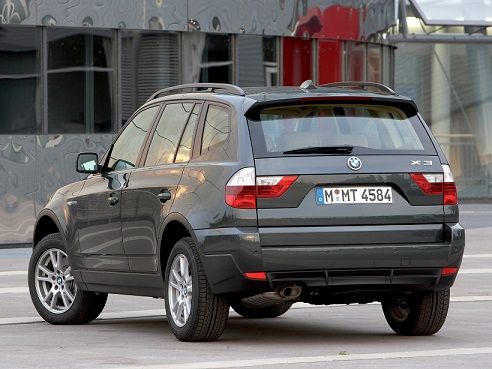
The integration of a Bluetooth car kit for a BMW X3 2007 represents a significant upgrade to the driving experience, merging classic German engineering with modern connectivity. For owners of this specific model year, the ability to make hands-free calls or stream audio without the clutter of cables is often seen as an essential modernization. This focus on the 2007 BMW X3 highlights a specific era of the Sports Activity Vehicle, which predates the more technologically saturated models that followed. While the vehicle came with a robust infotainment system for its time, the addition of Bluetooth functionality addresses the contemporary need for seamless smartphone integration.
Understanding the 2007 BMW X3 Infotainment System
Before diving into the installation of an aftermarket solution, it is important to understand the native capabilities of the 2007 X3's factory head unit. The vehicle was typically equipped with either a standard radio or the more advanced BMW Professional navigation system. The key limitation of the OEM (Original Equipment Manufacturer) setup was the absence of built-in Bluetooth for audio streaming or hands-free calling. While the system featured auxiliary inputs and potentially a CD changer with audio input, these wired solutions fail to provide the wireless convenience that Bluetooth offers. Consequently, owners were historically restricted to using physical connections or relying on the vehicle’s premium audio system without smartphone integration.
The Case for Aftermarket Bluetooth Integration
Installing a dedicated Bluetooth car kit is the most common and effective method for adding wireless functionality to a 2007 X3. These devices are specifically designed to interface with the factory stereo, preserving the original BMW aesthetic and functionality. A quality kit will connect directly to the amplifier or head unit via the AUX input or cassette deck connections, depending on the specific model. This allows the Bluetooth module to act as a bridge, transmitting audio from the phone to the speakers and transmitting microphone audio back for clear calls. The installation is generally considered moderate, requiring basic mechanical skills and the removal of the center console, but it avoids the complexity of a full head unit replacement.


Key Features and Compatibility
When selecting a Bluetooth kit for the 2007 X3, it is crucial to ensure compatibility with the specific trim level and stereo model. Most kits on the market are universal, utilizing a flexible wiring harness that can tap into the standard RCA or ISO connectors found in most vehicles from that era. Key features to look for include automatic audio switching, which mutes the radio when a phone call comes in, and built-in Digital Signal Processing (DSP) to enhance microphone pickup quality. Additionally, support for both A2DP (for music streaming) and Hands-Free Profile (HFP) is non-negotiable for a complete experience. The unit should ideally draw power directly from the fuse box to ensure it shuts off with the vehicle and does not drain the battery.
| Feature | Description | Benefit for 2007 X3 Owner |
|---|---|---|
| Plug-and-Play Installation | Utilizes existing AUX port or wiring. | Maintains original BMW wiring integrity. |
| Dual-Microphone Array | Cancels background road noise. | Ensures the driver's voice is clear during calls. |
| Automatic Connection | Pairs automatically when the car is started. | Reduces driver distraction while driving. |
Installation Process and Best Practices
The installation of a Bluetooth kit requires a methodical approach to ensure a clean result. The first step involves accessing the center console and the rear of the head unit, which is often the most technically demanding part of the process. It is recommended to use trim removal tools to avoid scratching the plastic surfaces. Once the head unit is accessed, the installer should locate the AUX input cables or the output post for the amplifier. The Bluetooth module’s wiring is then carefully spliced into these cables, with careful attention to matching the ground, positive, and audio channels correctly. Securing the module with zip ties and routing the wires away from moving components is essential for long-term reliability.


Maintaining BMW’s Premium Experience
One of the primary concerns for BMW X3 owners is maintaining the integrity of the vehicle’s interior. A poorly installed Bluetooth kit can result in dangling wires, loose connectors, or a bulky module visible in the center console. To preserve the premium feel, it is advisable to choose a kit that offers a sleek, compact design with a remote control unit placed neatly in the glove compartment or center console. This ensures that the technology serves its purpose without compromising the sophisticated cabin atmosphere that BMW is known for. The goal is enhanced functionality, not a visible modification that detracts from the vehicle’s luxury appeal.
Ultimately, adding Bluetooth connectivity to a 2007 BMW X3 is a rewarding project that significantly enhances the vehicle’s usability. It allows the driver to stay connected and safe while enjoying the robust audio capabilities of the car. By choosing the right hardware and executing a clean installation, the 2007 X3 can easily transition from a classic luxury SUV to a modern connected driving machine, ready for the demands of today’s road and digital life.




Related Articles

Ultimate Bluetooth BMW E60 Upgrade: Seamless Hands-Free Driving
The integration of a Bluetooth BMW E60 system represents a significant evolution in in-car connectivity, transforming the driving experience in a 5 Series from...

Upgrade Your BMW with Apple CarPlay: The Ultimate Seamless Driving Experience
Upgrading your BMW Apple CarPlay transforms the in-car experience from a simple convenience into a seamless extension of your digital life. For many drivers...

2016 Hyundai Bluetooth: Easy Pairing & Seamless Hands-Free Driving
Stepping into a 2016 Hyundai vehicle means entering an environment where connectivity is seamless and intuitive, largely thanks to the integrated Bluetooth...

2007 BMW 530i Bluetooth: Seamless Upgrade Guide
Owning a 2007 BMW 530i means driving a car that redefined luxury in its era, combining a responsive inline-six engine with a sophisticated European design...

2024 Hyundai Veracruz Bluetooth: Seamless, Hands-Free Driving
For Hyundai Veracruz owners seeking a seamless connection between their personal technology and in-car entertainment, the integration of Bluetooth...

Seamless Bluetooth Toyota Highlander 2010 Upgrade: Audio & Hands-Free Kit
Finding the right connectivity solution for your 2010 Toyota Highlander often starts with a simple goal: streaming music from your phone without the mess of...