CarPlay for BMW X3 2007: Easy Installation & Smart Driving
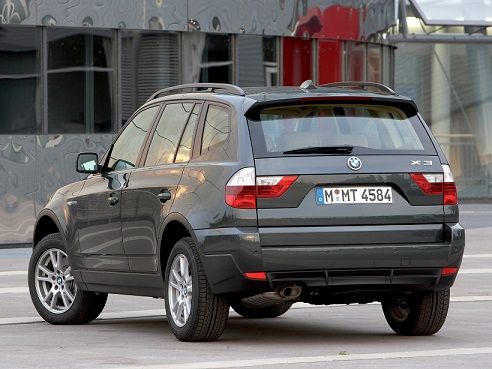
Integrating Apple CarPlay into a 2007 BMW X3 represents a significant modernization effort for a decade-old luxury SUV. While the X3 E83, produced from 2004 to 2010, established a benchmark for premium compact luxury crossovers, its original infotainment hardware is incompatible with modern smartphone expectations. This guide explores the specific challenges, viable upgrade paths, and technical considerations associated with introducing CarPlay functionality to a 2007 model year vehicle.
Understanding the 2007 BMW X3 Infotainment Landscape
The 2007 BMW X3 was typically equipped with either the Business CD radio (non-navigation) or the Premium Multimedia navigation system. These systems rely on proprietary BMW logic boards and lack the AUX inputs or USB ports that became standard years later in the automotive industry. The original head unit runs on a closed embedded operating system that cannot natively support iOS protocols, making a direct connection impossible without an interface module.
Factory Limitations and Connectivity Gaps
Unlike modern vehicles designed with OEM CarPlay integration, the 2007 X3 lacks the necessary hardware foundation. There is no dedicated USB-C or Lightning port on the center console, and the wiring harness for the audio system does not include the differential signaling required for digital audio transfer. Consequently, attempting to connect an iPhone via a standard 3.5mm auxiliary cable results only in a basic audio playback device, with no access to the CarPlay interface, messaging, or navigation features.


The Retrofit Solution: Aftermarket Head Units
The most effective method to bring CarPlay to a 2007 BMW X3 is through a full head unit replacement. This involves removing the original BMW radio and installing a modern double-DIN Android or iOS multimedia unit designed for retrofit applications. These units are engineered to fit the specific cavity of the E83 X3, preserving the factory dashboard aesthetic while providing the connectivity required for CarPlay.
- Plug-and-Play Harnesses: Quality aftermarket kits include a custom wiring harness that interfaces directly with the BMW bus system, ensuring proper power distribution and vehicle integration.
- Retained BMW Features: High-end retrofit kits can preserve steering wheel controls, factory amplifier integration, and even the iDrive functionality, ensuring the car feels cohesive.
- Android Auto Compatibility: Many of these units support both CarPlay and Android Auto, providing flexibility for users with different smartphone ecosystems.
Installation Process and Technical Considerations
Installing a CarPlay-compatible head unit in a 2007 X3 is not a simple "plug-and-play" endeavor. It requires a moderate level of electrical and mechanical expertise. The installation typically involves splicing into the vehicle's power and ground circuits, as well as the CAN-BUS network to ensure the dashboard computer recognizes the new unit. Furthermore, integrating the backup camera feed and parking sensor signals often requires additional interface modules to convert the analog signals to digital.


| Component | Original 2007 X3 | Aftermarket CarPlay Unit |
| Operating System | BMW Proprietary Legacy OS | Android 10/11 or iOS Integration |
| Connectivity | CD Changer Port (Optional) | USB-C, Bluetooth 5.0, WiFi |
| Navigation | DVD-Based Maps (Aging) | Google Maps / Apple Maps / Waze |
Performance and User Experience
A modern CarPlay interface transforms the driving experience in a 2007 X3. The responsiveness of iOS or Android combined with the sharp graphics of a new LCD screen provides a stark contrast to the grainy, low-resolution display of the original unit. Features such as turn-by-turn navigation, real-time traffic updates, and voice command functionality elevate the vehicle's usability, effectively extending its technological lifespan by a decade.
Legal and Warranty Implications
When modifying a classic luxury vehicle, it is essential to consider the implications for insurance and resale value. While a professionally installed head unit is generally viewed as an upgrade, it is crucial to inform your insurance provider of the modification. Additionally, maintaining documentation of the installation is vital for potential future buyers, as it verifies that the vehicle's electronic systems are functioning correctly and adhere to safety standards.
The Verdict on CarPlay for the 2007 X3
For the owner of a 2007 BMW X3, adding CarPlay is less of a convenience and more of a necessity to keep the vehicle relevant in the digital age. While it requires a financial investment and a professional installation, the return in terms of safety, connectivity, and daily usability is substantial. It breathes new life into the chassis, proving that with the right technology, a well-engineered machine from the past can easily meet the standards of the present.




Related Articles

Best Garage Door Opener for Hyundai Palisade 2024: Smart & Easy Install
For the Hyundai Palisade owner seeking to modernize their garage, the integration of a smart garage door opener represents a significant step toward...

Master Hyundai Highway Driving Assist 2: Ultimate Safe & Smart Cruise Control
Highway driving has always been a test of a driver’s endurance, focus, and precision. The constant stream of vehicles, the need for steady lane discipline, and...

2024 Hyundai Sedan Hybrid: Power, Efficiency, & Smart Driving
The 2024 Hyundai sedan hybrid lineup represents a significant evolution in the brand's commitment to sustainable mobility without compromising the driving...

BMW Style 5 Hub Caps: Sleek Design & Easy Installation
The quest for the perfect wheel finish often leads enthusiasts to consider bmw style 5 hub caps, a component that bridges the gap between classic aesthetics...

Ultimate BMW Aftermarket Tail Lights: Style, Performance, and Easy Installation
For the BMW enthusiast looking to move beyond the factory-spec aesthetic, aftermarket tail lights represent one of the most impactful modifications available...

Smart Auto Toyota: The Ultimate Guide to Intelligent Driving & Innovation
The smart auto Toyota ecosystem represents a significant evolution in how we interact with our vehicles, blending cutting-edge technology with the brand's...