How to Change the Battery in a Toyota Corolla Key Fob: Step-by-Step Guide
Replacing the battery in your Toyota Corolla key fob is a straightforward process that saves you time and money compared to visiting a dealer. This simple maintenance task ensures your remote entry, panic, and ignition start features continue to work without interruption. Most Toyota models, including the Corolla, use a standard CR2032 coin cell battery that is widely available at pharmacies and auto parts stores.
Gathering the Necessary Tools
Before you begin, collect the items required for a smooth and efficient battery replacement. Having everything prepared prevents frustration and avoids scratching the key fob during disassembly. The process is designed to be accessible, but using the right tools protects the plastic housing.
- New CR2032 3V Lithium Coin Battery
- Small Standard Screwdriver or Mechanical Pencil
- Soft Cloth or Microfiber Towel
- Magnifying Glass (optional, for easier viewing)
Identifying the Key Fob Model
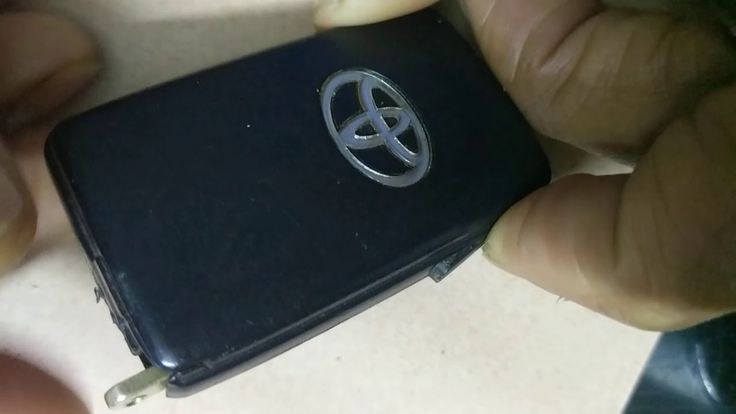
Toyota has used different key fob designs over the years, and identifying your specific model is a critical first step. The method for opening the fob varies slightly between a slim remote design and a thicker version with a built-in mechanical key. Confirming the design ensures you apply the correct amount of pressure when separating the two halves.


Slim Key Fob (Without Detachable Key)
This model features a uniform thickness and typically requires a penny or a thin coin to pop open the seam. It relies on a small metal blade that slides out of the remote itself rather than a separate key piece.
Standard Key Fob (With Detachable Key)
If your key fob has a mechanical key that slides out, you will need to press a release button on the side to remove it. The fob body usually opens with a screwdriver or by carefully prying the seam with your fingers once the key is removed.


Step-by-Step Replacement Procedure
With the correct key fob identified and tools gathered, you are ready to access the battery compartment. The internal components are sensitive, so following these steps carefully prevents damage to the circuit board or misalignment of the buttons.
- Locate the small seam or indentation on the edge of the key fob.
- Insert the screwdriver or pencil tip into the seam and gently twist to separate the two halves.
- Carefully lift off the top shell to expose the battery clip.
- Note the orientation of the old battery (positive side up or down) before removing it.
- Use the screwdriver edge to pop out the old CR2032 battery.
- Insert the new battery, ensuring the positive side matches the previous orientation.
- Press the two halves firmly together until they snap into place.
Common Mistakes to Avoid
Even a simple task like this has potential pitfalls that can render the key fob inoperable. Applying too much force when prying the case can crack the plastic or break the internal wiring. Equally common is installing the new battery with the incorrect polarity, which prevents the system from recognizing the signal.
- Do not use excessive force when separating the key fob halves.
- Avoid using metal tools directly on the circuit board to prevent short circuits.
- Never install the battery backward or sideways.
- Ensure the key fob is wiped clean of any debris before reassembly.
Testing the Key Fob
Once the battery is installed and the fob is reassembled, a quick test is necessary to confirm the repair was successful. You should verify that all functions—locking, unlocking, and panic—are operational before heading out. This immediate validation ensures you did not accidentally damage a contact during the process.



| Function | Expected Result |
|---|---|
| Unlock Doors | All doors unlock with a single button press |
| Lock Doors | All doors lock and confirm with a chirp or light flash |
| Panic Button | Activates loud siren and hazard lights |
| Start Button | Engine starts without delay (if equipped) |
When to Seek Professional Help
While the majority of Toyota Corolla key fob battery changes go smoothly, certain issues indicate a deeper problem. If the key fob does not respond after replacing the battery, the internal circuit board may have suffered damage, or the contacts require cleaning. Persistent issues with the remote entry system could signify a need for reprogramming or a faulty receiver module that only a certified mechanic can diagnose.
Regularly checking the battery life every few months prevents being stranded without access to your vehicle. By mastering this simple procedure, you maintain the convenience and security of your Toyota Corolla while avoiding unnecessary service fees.


Related Articles
How to Change Key Fob Battery for Toyota Corolla: Step-by-Step Guide
For the Toyota Corolla owner, the key fob is more than a piece of plastic; it is the digital handshake that grants access and starts the engine. When the...

How to Change a Car Battery for a Toyota Corolla: Easy Step-by-Step Guide
Replacing the battery in your Toyota Corolla is a straightforward maintenance task that can save you both time and money. Whether you are facing a slow crank...

How to Change Battery in Your Toyota CHR Key Fob: Easy Step-by-Step Guide
Replacing the battery in your Toyota CH-R key fob is a straightforward process that ensures your remote entry system continues to function without...

2019 Toyota Corolla Battery Price: Cost Guide & Replacement Tips
Understanding the Toyota Corolla 2019 battery price is essential for any owner looking to maintain their vehicle's reliability. The 1.8-liter model, standard...
How to Change Key Fob Battery Toyota GR86: Quick & Easy Guide
Changing the key fob battery in your Toyota GR86 is a straightforward maintenance task that ensures you never get locked out unexpectedly. This simple...
How to Replace the Battery in a 2015 Toyota Camry Key Fob: Easy Step-by-Step Guide
For the 2015 Toyota Camry owner, the key fob is more than a piece of plastic; it is the digital bloodline to your vehicle. When the reassuring chirp of the...