How to Change Your Toyota Corolla Key Battery: Easy Step-by-Step Guide
Changing the battery in your Toyota Corolla key fob is a straightforward task that can save you a trip to the dealership and the associated service fee. Whether your key is struggling to lock the doors from a distance or the push-button start is unresponsive, the solution is often a simple battery replacement. This guide walks you through the precise steps for the most common Toyota key types, ensuring you complete the job quickly and correctly.
Identifying Your Toyota Corolla Key Model
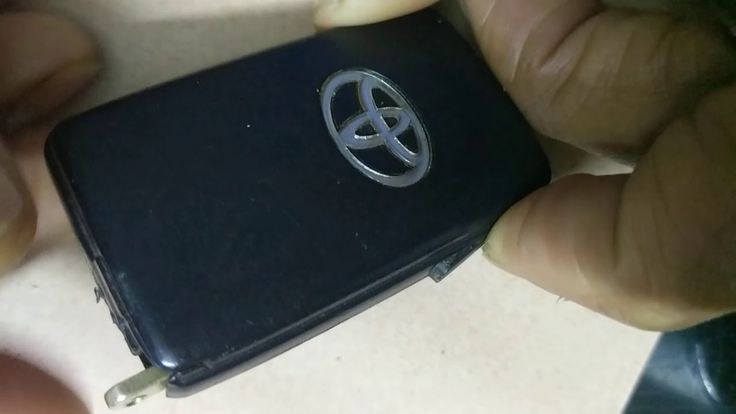
Before you begin, it is essential to identify which key generation your Corolla uses, as the internal layout differs. Models from the 2010s to present typically use a smart key with a hidden mechanical blade, while older models might use a standard remote with a press-button fob. You can usually determine the type by looking at the key itself: if you press a button and a metal key pops out, it is a smart key; if the entire unit is a remote, it is a standard key. Getting this right ensures you follow the correct procedure without damaging the casing.
Gathering the Necessary Tools and Battery
Having the right tools on hand makes the process smooth and prevents frustrating delays. You will need a specific type of coin cell battery, usually a CR2032, which is widely available at pharmacies, hardware stores, or online retailers. Additionally, prepare a small, flat-head screwdriver or a coin to pry open the key fob, a soft cloth to protect the surfaces, and a clean workspace with good lighting. Ensuring you have a fresh, quality battery rated for 3 volts will guarantee reliable signal transmission for years.


Replacing the Battery in a Smart Key (Button Key)
Step 1: Access the Internal Housing
Smart keys are designed to be tamper-proof, so accessing the battery requires a bit of finesse. Locate the small release mechanism, often a tiny button or a slot near the key ring attachment. Press this while simultaneously pulling the mechanical key out of the fob. Once the key is removed, you will see a seam running around the perimeter of the two key fob halves.
Step 2: Opening the Key Fob
Using your flat-head screwdriver or coin, gently wedge it into the seam of the key fob. Apply steady, even pressure to pop the two halves apart. Avoid using excessive force, as the plastic clips are brittle and can crack. If the seam is difficult to open, try locating a thin slot at the top of the fob that might provide better leverage for the tool.


Step 3: Replacing the Battery
With the fob open, you will see the battery secured in a small plastic holder. Note the orientation of the battery; there is usually a plus (+) sign facing up. Carefully lift the old battery out using the tip of your screwdriver or your fingernail. Take the new CR2032 battery and place it into the holder with the positive side facing up, ensuring it sits flush in the slot. Align the two halves of the fob and press them firmly together until you hear all the clips snap into place.
Replacing the Battery in a Standard Remote Key
Step 1: Opening the Key Fob
Standard remote keys are generally easier to open. Look for a seam around the sides of the fob. Insert your screwdriver or coin into this seam and twist gently to separate the two halves. The key might have a lanyard or a small mechanical ring attached, so be careful not to let the internal components fall out.
Step 2: Inspecting and Replacing the Battery
Once open, you will see the circuit board and the battery, which is typically held in place by a plastic clip. Before removing the old battery, take a moment to note the orientation of the positive and negative terminals. Release the clip or slide the battery out, and insert the new one with the correct polarity. Ensure the battery is seated firmly under the clip so that it makes proper contact, then snap the fob back together securely.




Testing the Key Fob After Replacement
After reassembly, it is vital to confirm that the new battery is functioning correctly. Stand close to the vehicle and press the lock or unlock button. You should see the confirmation lights on the fob blink, and the car doors should respond immediately. Next, test the range by moving several feet away and repeating the process to ensure the signal is strong. For smart keys, also test the mechanical key operation to ensure it slides out smoothly for emergency use.
Disposal and Safety Tips
Lithium coin cell batteries pose a significant environmental hazard if disposed of in regular trash. You should never throw the old battery in the garbage. Instead, take it to a local electronics store or a municipal recycling center that accepts batteries. Many home improvement stores and auto parts chains also have designated bins for battery recycling. Handling the battery carefully is also important; avoid bending or puncturing the casing, as the contents are caustic.


Related Articles
How to Change Battery in Your Toyota CHR Key Fob: Easy Step-by-Step Guide
Replacing the battery in your Toyota CH-R key fob is a straightforward process that ensures your remote entry system continues to function without...

How to Change a Car Battery for a Toyota Corolla: Easy Step-by-Step Guide
Replacing the battery in your Toyota Corolla is a straightforward maintenance task that can save you both time and money. Whether you are facing a slow crank...
How to Change Key Fob Battery for Toyota Corolla: Step-by-Step Guide
For the Toyota Corolla owner, the key fob is more than a piece of plastic; it is the digital handshake that grants access and starts the engine. When the...
How to Change Your Toyota Key Battery: Easy DIY Guide
Replacing the battery in your Toyota key fob is a straightforward process that saves time and money compared to a dealer visit. Modern Toyota key fobs, whether...
How to Change Key Fob Battery Toyota GR86: Quick & Easy Guide
Changing the key fob battery in your Toyota GR86 is a straightforward maintenance task that ensures you never get locked out unexpectedly. This simple...
How to Replace the Battery in a 2015 Toyota Camry Key Fob: Easy Step-by-Step Guide
For the 2015 Toyota Camry owner, the key fob is more than a piece of plastic; it is the digital bloodline to your vehicle. When the reassuring chirp of the...