Hyundai Ioniq 5 Dashboard Symbols: Meanings & Easy Guide
Understanding the Hyundai Ioniq 5 dashboard symbols is essential for safe and efficient operation of this advanced electric vehicle. The digital cluster and central display provide a wealth of information, but the various icons can sometimes feel cryptic to new owners. This guide translates those visual signals into clear, actionable knowledge, helping you navigate everything from routine driving to potential system alerts.
Decoding the Digital Cluster Icons
The Ioniq 5's primary dashboard is a digital screen that adapts its display based on driving mode and driver settings. Several key icons remain constant, serving as the primary communication channel between the vehicle and the driver regarding speed, battery, and drive mode. Recognizing these static symbols is the first step in mastering your Ioniq 5's interface.
Critical Power and Drive Status
Three icons form the foundation of your Ioniq 5's status reporting. The high-voltage battery icon, depicted as a battery with a lightning bolt, indicates the electric powertrain is active. The drive mode icon, showing a stylized "D" for Drive, "N" for Neutral, or "R" for Reverse, confirms your selected setting. Finally, the regenerative braking icon, displayed as an arrow curving into a battery, visually confirms that energy is being captured during deceleration, a signature feature of the electric driving experience.


Navigating Warning and Alert Symbols
While the Ioniq 5 is engineered for reliability, the dashboard will alert you to conditions requiring attention. These symbols range from helpful reminders to critical warnings that demand immediate action. Knowing the difference between a low-priority notification and a serious system fault can prevent downtime and ensure safety.
Battery and Charging Alerts
- Battery Overheat Warning: A thermometer symbol next to a battery indicates the battery temperature is outside the optimal range, requiring reduced power output or cooling.
- Charging System Fault: A charging cable with an "X" through it appears if the vehicle detects an issue with the incoming charge, such as a connector problem or communication error.
- Low Charge Alert: A battery icon with a downward arrow signals that the state of charge is low and charging is recommended soon to maintain operational readiness.
Safety and Stability Warnings
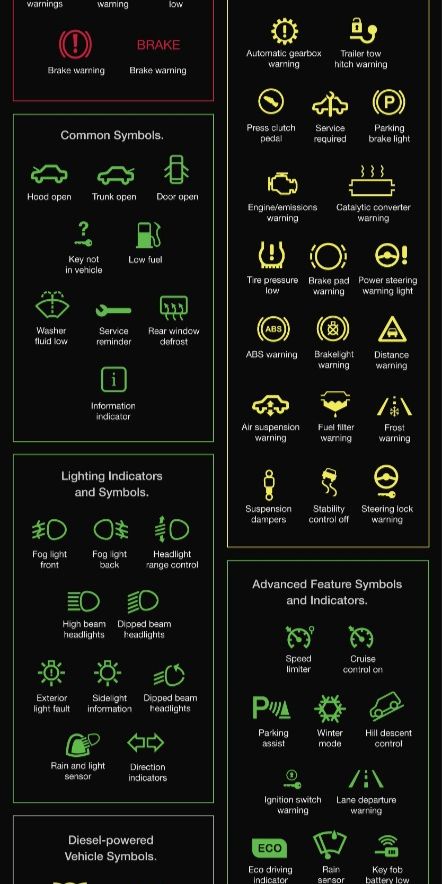
The Hyundai SmartSense suite is comprehensive, and its alerts are prominently featured on the dashboard. The tire pressure monitoring system (TPMS) icon, resembling a cross-section of a tire with an exclamation mark, warns of low tire pressure, which can affect handling and efficiency. The Electronic Stability Control (ESC) off icon, showing a car with wavy lines behind it, indicates the stability system is deactivated, which is not recommended in adverse conditions. A steering lock icon, while rare in normal operation, signals a potential issue with the power steering system or an engaged security lock.


Informational and System Indicators
Not all dashboard symbols are warnings; many provide useful information to enhance your driving experience. These include indicators for the automatic climate control, door ajar warnings, and the seatbelt reminder. These icons ensure you are comfortable, secure, and compliant without being intrusive.
Vehicle Settings and Diagnostics
The "Check Engine" equivalent for electric vehicles is the General Fault icon, which resembles an engine with a warning triangle. If this appears, it indicates a system malfunction that requires diagnosis by a certified Hyundai dealer. Additionally, an Eco or Sport mode icon will display when the corresponding driving mode is active, helping you understand the vehicle's current performance tuning at a glance.


Related Articles

2025 Hyundai Elantra Dashboard Symbols: Complete Guide & Meanings
Driving a 2025 Hyundai Elantra is an exercise in modern automotive efficiency, blending a sleek design with a tech-forward cabin. Behind the steering wheel...

2016 Toyota Corolla Dashboard Symbols: Easy Meanings & Guide
Understanding the 2016 Toyota Corolla dashboard symbols is essential for every driver, as these visual alerts are the vehicle’s primary method of communicating...
2024 Hyundai Tucson Dashboard Symbols: Meanings & Guide
Understanding the language of your 2024 Hyundai Tucson is essential for safe and confident driving. The dashboard serves as the central communication hub...
2024 Hyundai Dashboard Symbols & Meanings: Complete Guide
Understanding the language of your 2024 Hyundai is crucial for safe and confident driving. The dashboard serves as the vehicle's communication hub, utilizing a...

Toyota Dashboard Symbols: Quick & Easy Guide to Meanings
Understanding the language of your dashboard is one of the most critical skills for any Toyota owner. These illuminated icons are not merely decorative; they...

Toyota Yaris Dashboard Symbols: Easy Meanings & Guide
Understanding the language of your Toyota Yaris dashboard is crucial for responsible vehicle ownership. These illuminated symbols function as the car’s primary...