Toyota Key Fob Battery Replacement: Easy & Affordable DIY Guide
Getting locked out of your Toyota because of a dead key fob battery is one of the most inconvenient experiences a driver can face. This small component, often overlooked, is the gateway to your vehicle's advanced security and convenience features. Fortunately, replacing the battery is a straightforward process that you can perform at home with minimal tools. Understanding the procedure, from identifying the correct battery type to safely resetting the system, saves both time and money compared to a trip to the dealership.
Modern Toyota key fobs are engineering marvels of compact design, integrating remote entry, panic alarms, and in some models, push-start ignition. This sophistication, however, relies on a simple power source: a small coin cell battery. Over time, usually within three to five years, this battery depletes its charge. Recognizing the warning signs—such as needing to press the button closer to the car or the dashboard displaying a key battery warning—is the first step in preventing an unexpected breakdown of your vehicle's security system.
Identifying Your Toyota Key Fob Model
Not all Toyota key fobs are created equal, and using the wrong battery type can damage the device. Before proceeding, you must identify the specific model number of your key fob, which is usually printed on the back housing. Common models include the RKE2, RKE200, and SmartKey variants, each requiring a specific battery specification. Knowing the exact model ensures you purchase the correct replacement and avoids complications during the programming step.


Common Battery Types and Specifications
The vast majority of Toyota key fobs utilize a 3-volt lithium coin cell, specifically model number CR2032. This battery is widely available at pharmacies, grocery stores, and auto parts retailers. While some older models might use a CR2025, the CR2032 is the industry standard for its decade of manufacture. Always opt for a high-quality brand to ensure longevity and reliable performance in extreme temperature conditions.
| Key Fob Model | Battery Type | Typical Lifespan |
|---|---|---|
| RKE2 (2020+) | CR2032 | 3-5 years |
| SmartKey (Push-Start) | CR2032 | 2-4 years |
| Remote Entry (Older Models) | CR2032 or CR2025 | 2-3 years |
Step-by-Step Replacement Procedure
Replacing the battery is a delicate process that requires patience to avoid breaking the thin plastic clips of the key fob. The general approach involves prying the key fob seam open, removing the old battery, and inserting the new one with the correct polarity. It is highly recommended to perform this task on a clean, flat surface with good lighting to prevent losing tiny internal components.


Tools and Preparation
You will need a small, flat-head screwdriver or a specialized Toyota key fob tool to apply leverage. A soft cloth or towel is also advisable to protect the key fob from scratches during the procedure. Ensure your hands are clean and dry to avoid contaminating the battery contacts or static damaging the electronics. Gather these items before starting to ensure a smooth workflow.
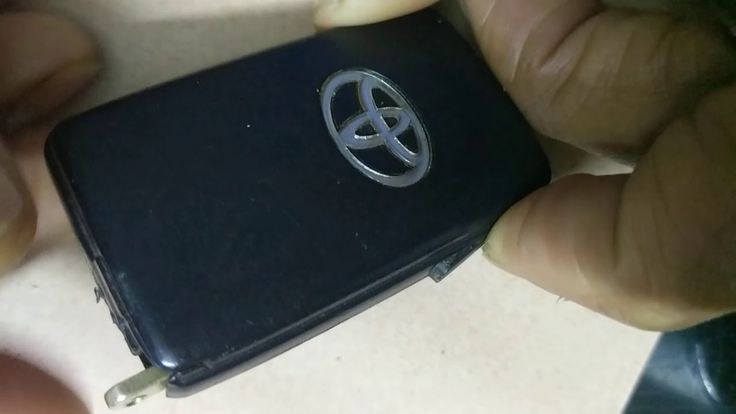
Begin by locating the small seam on the side of the key fob where the keychain ring is attached. Insert the tip of your screwdriver into this seam and apply gentle pressure to pop the two plastic halves apart. Work slowly and evenly around the circumference; excessive force can crack the casing. Once separated, you will see the internal circuit board and the battery cradle holding the coin cell in place.
Programming and Resetting
After inserting the new battery—ensuring the positive side faces up—you might assume the process is complete. However, many Toyota models require a synchronization step to recognize the key. This usually involves cycling the ignition switch on and off multiple times or pressing specific buttons on the reprogrammed fob. Refer to your owner’s manual for the exact sequence to avoid frustration.


Ultimately, successfully replacing the battery restores the convenience and security of your Toyota. The sense of accomplishment from completing this DIY task is unmatched, and you can now drive with confidence knowing your key fob is fully operational. Save this guide for future reference, and you will never be stranded by a simple battery issue again.




Related Articles
Toyota GT86 Key Fob Battery Replacement: Easy & Affordable Guide
Owning a Toyota GT86 means embracing a driving experience built on precision, balance, and a manual transmission that puts the driver in control. Consequently...
New Toyota Car Key Battery: Easy Replacement Guide
Finding the right new battery for your Toyota car key is a critical task for any vehicle owner. A failing key fob can lead to frustrating situations, such as...

BMW F30 Key Fob Battery Replacement: Easy & Affordable DIY Guide
For the owner of a BMW F30, the key fob is more than just a remote; it is the digital key to your driving experience. When the battery inside this compact...

Where to Buy a BMW Car Key Battery: Easy & Affordable Replacement Guide
Owning a BMW comes with a specific set of considerations, and one of the most frequent yet overlooked maintenance items is the key fob battery. When your...

Toyota Prius Hybrid Battery Replacement: Affordable Cost & Guide
Owning a Toyota Prius means embracing a legacy of efficiency and reliability, yet every mechanical system has its limits. The hybrid battery, the heart of your...

2007 BMW X3 Key Fob Battery Replacement: Easy & Affordable DIY Guide
Replacing the battery in your 2007 BMW X3 key fob is a straightforward procedure that can save you the time and expense of a dealer visit. The original key fob...