Toyota Corolla Key Fob Battery Change: Easy DIY Guide
For Toyota Corolla owners, understanding how to change the Toyota Corolla key fob battery is a fundamental skill that ensures continued convenience and security. A failing key fob battery often manifests with warning signs such as a reduced signal range or a need to press the button multiple times before the car responds. Ignoring these signs can lead to frustrating situations where you are locked out of your vehicle or unable to start it from a distance. This guide provides a clear, step-by-step process to replace the battery quickly and safely, empowering you to handle this routine maintenance without a trip to the dealer.
Identifying the Need for a Battery Replacement
Before diving into the Toyota Corolla key fob battery change procedure, it is essential to confirm that the battery is indeed the culprit. Common symptoms include a key fob that no longer locks or unlocks the doors with a click, a significantly shorter range, or a complete lack of response when pressing any button. If the buttons feel loose or require excessive force, this is usually a sign of a dead battery rather than a mechanical fault. Diagnosing the issue correctly saves time and prevents unnecessary troubleshooting of the vehicle's ignition system.
Gathering Your Tools and Preparation
Preparation is key to a smooth Toyota Corolla key fob battery change, and having the right tools on hand makes the process efficient. You will typically need a small Phillips screwdriver or a specialized battery replacement tool, a fresh CR2032 3V lithium battery, and a clean, flat workspace with good lighting. It is also wise to keep a soft cloth nearby to prevent scratches on the key fob housing. Ensuring you have everything ready before starting minimizes the risk of damaging the delicate internal components of the remote.


Step-by-Step Replacement Guide
The actual Toyota Corolla key fob battery change is a straightforward process that involves careful disassembly and reassembly. The goal is to separate the two halves of the key fob without damaging the circuit board or the mechanical buttons. By following the specific sequence below, you can access the battery compartment safely and install the new power source with confidence.
Step 1: Removing the Mechanical Key
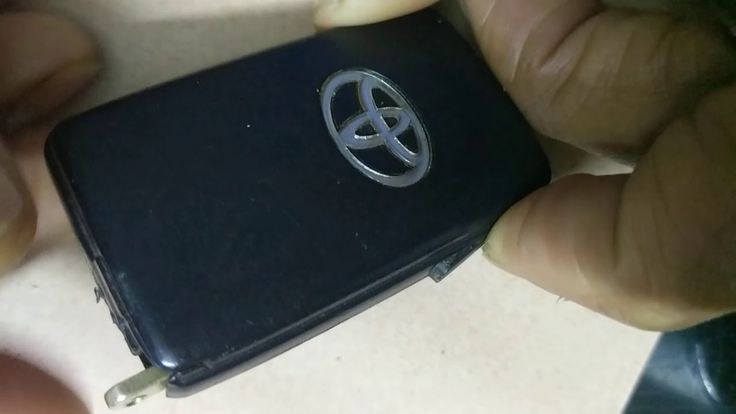
Most Toyota Corolla key fobs contain a hidden mechanical key that slides out for use on the vehicle's door locks. To begin the Toyota Corolla key fob battery change, locate the small release button or switch on the side of the fob. Press this button to eject the mechanical key fully. Once the key is removed, you will see the seam where the two halves of the fob meet, preparing the unit for the next step in the Toyota Corolla key fob battery change.


Step 2: Separating the Key Fob Halves
With the mechanical key removed, grip both halves of the key fob firmly—one in each hand. Carefully pull the two halves apart along the seam. A slight amount of force is usually required, but it is crucial to apply steady pressure without twisting the device. You want to separate the casing without damaging the circuit board inside. If you encounter significant resistance, double-check that the mechanical key has been fully ejected, as it can sometimes obstruct the separation.
Step 3: Replacing the CR2032 Battery
Now that the fob is open, you will see the old CR2032 battery secured in a small compartment. Before removing it, note the orientation of the positive (+) side, which is usually marked inside the slot. Use your fingernail or a small tool to pop the old battery out of its housing. Take your new CR2032 battery and insert it into the slot with the positive side facing up, ensuring it clicks into place securely. This correct polarity is vital for the proper function of the Toyota Corolla key fob battery change.
Reassembly and Testing
After installing the new battery, the final phase of the Toyota Corolla key fob battery change involves reassembling the device and verifying its functionality. Align the two halves of the fob carefully, making sure the circuit board sits flat without being pinched. Apply even pressure to snap the casing back together until it clicks. Once reassembled, test the fob by approaching the vehicle and pressing the lock and unlock buttons to confirm that the signals are strong and the doors respond immediately.


Proper Disposal and Final Tips
The old battery removed during the Toyota Corolla key fob battery change should not be discarded in regular household trash due to its lithium content. Most local pharmacies, hardware stores, or recycling centers accept lithium batteries for safe disposal. Going forward, if you notice intermittent responses from your fob, check the battery voltage with a multimeter before it completely dies; a battery at 2.5V or lower should be replaced immediately to avoid being stranded.




Related Articles

How to Change a Car Battery for a Toyota Corolla: Easy Step-by-Step Guide
Replacing the battery in your Toyota Corolla is a straightforward maintenance task that can save you both time and money. Whether you are facing a slow crank...
How to Change Key Fob Battery Toyota GR86: Quick & Easy Guide
Changing the key fob battery in your Toyota GR86 is a straightforward maintenance task that ensures you never get locked out unexpectedly. This simple...
How to Change Key Fob Battery for Toyota Corolla: Step-by-Step Guide
For the Toyota Corolla owner, the key fob is more than a piece of plastic; it is the digital handshake that grants access and starts the engine. When the...
How to Change Battery in Your Toyota CHR Key Fob: Easy Step-by-Step Guide
Replacing the battery in your Toyota CH-R key fob is a straightforward process that ensures your remote entry system continues to function without...
How to Change Your Toyota Key Battery: Easy DIY Guide
Replacing the battery in your Toyota key fob is a straightforward process that saves time and money compared to a dealer visit. Modern Toyota key fobs, whether...

2019 Toyota Corolla Battery Price: Cost Guide & Replacement Tips
Understanding the Toyota Corolla 2019 battery price is essential for any owner looking to maintain their vehicle's reliability. The 1.8-liter model, standard...