Hyundai i10 Dashboard Symbols: Complete Guide to Meanings
Understanding the language of your Hyundai i10 dashboard is one of the most critical aspects of responsible vehicle ownership. These illuminated symbols act as a direct line of communication between the car's complex computer systems and the driver, relaying vital information about everything from engine health to brake function. Ignoring a warning light can lead to severe mechanical failure, safety risks, and costly repairs down the line.
While the i10's dashboard is designed for clarity, the array of symbols can be intimidating for new drivers or anyone unfamiliar with automotive iconography. This guide decodes the essential Hyundai i10 dashboard symbols and meanings, helping you interpret warnings and alerts with confidence. Knowing the difference between a routine reminder and a critical emergency can not only protect your vehicle but also ensure a safer journey for everyone on the road.
Mastering the Hyundai i10 Dashboard Layout
Modern Hyundai i10 models utilize a combination of traditional indicator lights and digital notifications managed through the LCD screen. These symbols are generally grouped by function and severity, allowing you to quickly assess the urgency of a situation. The layout is standardized across most markets, although specific icons might vary slightly depending on the production year and optional equipment packages.


Typically, alerts fall into three distinct categories: routine operational notifications, cautionary warnings that require attention soon, and critical warnings that demand immediate action. Familiarizing yourself with these categories ensures you react appropriately, whether it’s scheduling a maintenance check or pulling over to the side of the road immediately.
Critical Warning Symbols (Immediate Action Required)
These indicators are designed to grab your attention for safety reasons. If any of these illuminate while driving, it is recommended to stop as soon as it is safe to do so and investigate the issue.


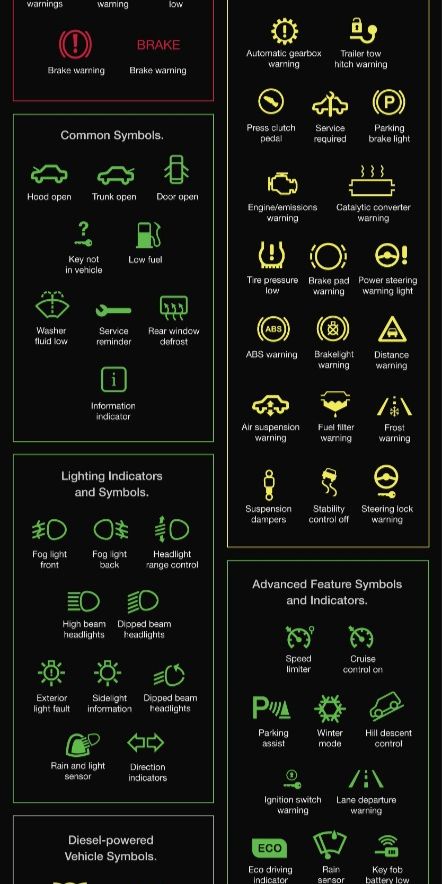
- Oil Pressure Warning: Represented by an old-fashioned oil can, this light indicates that oil pressure has dropped to a dangerous level. Continuing to drive can cause catastrophic engine damage. Turn off the engine immediately and check the oil dipstick.
- Brake System Warning: Often depicted as a circle with an exclamation point or the words "BRAKE." This could mean the parking brake is engaged, brake fluid is low, or there is a fault with the braking system itself. Do not ignore this light.
- Engine Temperature Warning: Shown as a thermometer submerged in liquid, this indicates the engine is overheating. Pull over safely and turn off the engine immediately to prevent warping or seizing.
Important System Alerts (Check Soon)
These symbols notify you of issues that aren't necessarily dangerous in the immediate term but require attention to prevent future breakdowns or maintain efficiency.
Fuel, Battery, and Maintenance Indicators
On the opposite end of the severity spectrum are the informational symbols that keep you running smoothly. While not urgent, addressing these promptly ensures optimal vehicle performance and prevents inconvenient strandings.
| Symbol | Meaning |
|---|---|
| Gas pump with drip | Low fuel remaining. It is advisable to refuel soon. |
| Battery charging | Indicates the battery is charging. If it appears while the engine is off or doesn’t turn off while driving, the alternator may be faulty. |
| Spinning circle with arrow | The Electronic Stability Control (ESC) or Traction Control is active, assisting the driver in maintaining grip. |
| Triangle with exclamation point | General warning or system alert. Often accompanies the seatbelt reminder or when a door is ajar. |
Beyond the critical and important alerts, the i10 incorporates a variety of driver-assist and convenience notifications. These often appear briefly on the dashboard or infotainment screen upon startup or when a specific condition is met.


Interpreting the Digital Cluster
Many trims of the Hyundai i10 come equipped with an Advanced Trip Computer display located in the instrument cluster. This digital screen provides a wealth of data that static symbols cannot. It can display real-time fuel economy, estimated driving range, average speed, and outside temperature.
While these digital readouts are not "symbols" in the warning sense, they interact with the warning system. For instance, if the digital display shows "ESP OFF," it means the stability control is disengaged. Understanding how to navigate this menu allows you to monitor your vehicle's health proactively and optimize your driving habits for better efficiency.


Related Articles

2025 Hyundai Elantra Dashboard Symbols: Complete Guide & Meanings
Driving a 2025 Hyundai Elantra is an exercise in modern automotive efficiency, blending a sleek design with a tech-forward cabin. Behind the steering wheel...
2024 Hyundai Dashboard Symbols & Meanings: Complete Guide
Understanding the language of your 2024 Hyundai is crucial for safe and confident driving. The dashboard serves as the vehicle's communication hub, utilizing a...
2022 Hyundai Dashboard Symbols: Complete Guide & Meanings
Understanding the language of your 2022 Hyundai is essential for safe and confident driving. The dashboard serves as the central communication hub between you...

Toyota Aqua Dashboard Symbols: Complete Guide to Warning Lights & Meanings
Understanding the dashboard symbols of your Toyota Aqua is more than just deciphering lights; it is about maintaining the safety, efficiency, and longevity of...

2009 BMW 528i Dashboard Symbols: Complete Guide & Meanings
Understanding the specific dashboard symbols for your 2009 BMW 528i is fundamental to maintaining the vehicle's renowned performance and safety. The...
Hyundai Ioniq 5 Dashboard Symbols: Meanings & Easy Guide
Understanding the Hyundai Ioniq 5 dashboard symbols is essential for safe and efficient operation of this advanced electric vehicle. The digital cluster and...